
Download Easy Auto Refresh – Free Chrome Extension for Automatic Page Reload
Overview
In the age of real‑time data, constantly clicking the refresh button can become a tedious habit. Easy Auto Refresh steps in as a lightweight, free Chrome add‑on that eliminates this repetitive task. Designed specifically for Windows users who browse with Google Chrome, the extension allows you to set a custom reload interval—ranging from a few seconds to several minutes—so that any webpage can stay up‑to‑date without manual intervention.
Whether you are monitoring live stock tickers, keeping an eye on breaking news, or simply wanting a fresh view of a social‑media feed, Easy Auto Refresh delivers a hands‑free experience. Its minimalist user interface lives right in the Chrome toolbar, making it instantly accessible. While the free version lacks some advanced safeguards—such as preventing loss of unsaved form data or auto‑detecting active user interaction—it remains a practical solution for users who need a straightforward, no‑frills auto‑refresh tool.
The extension’s simplicity, combined with its zero‑cost model, makes it an appealing addition to any Chrome‑centric workflow.
Key Features & Compatibility
- Customizable refresh intervals in seconds or minutes.
- One‑click activation via Chrome toolbar icon.
- Supports individual tab configuration for precise control.
- Lightweight code footprint ensures no noticeable slowdown.
- Automatic updates through the Chrome Web Store keep the extension current.
The extension is built to work seamlessly on Windows 10/11 systems running the latest versions of Google Chrome. Its Windows compatibility is guaranteed because it leverages Chrome’s native extension APIs, which are consistent across all Chrome releases on the platform. While the add‑on is not currently offered for macOS, Linux, Android, or iOS browsers, its core functionality remains fully supported on any Chrome instance that adheres to the Chromium standards. Users can also benefit from Chrome’s built‑in sandboxing, ensuring that the extension runs in a secure environment without exposing personal data. As Chrome pushes frequent security patches, Easy Auto Refresh receives automatic updates, guaranteeing that the tool stays compatible with the latest browser changes and continues to operate without interruptions.
Installation & Usage Guide
Getting started with Easy Auto Refresh is a breeze. Follow these step‑by‑step instructions to install and configure the extension:
- Open Google Chrome and navigate to the Chrome Web Store.
- Search for “Easy Auto Refresh” and click the Add to Chrome button.
- A confirmation dialog appears; select Add extension to complete the installation.
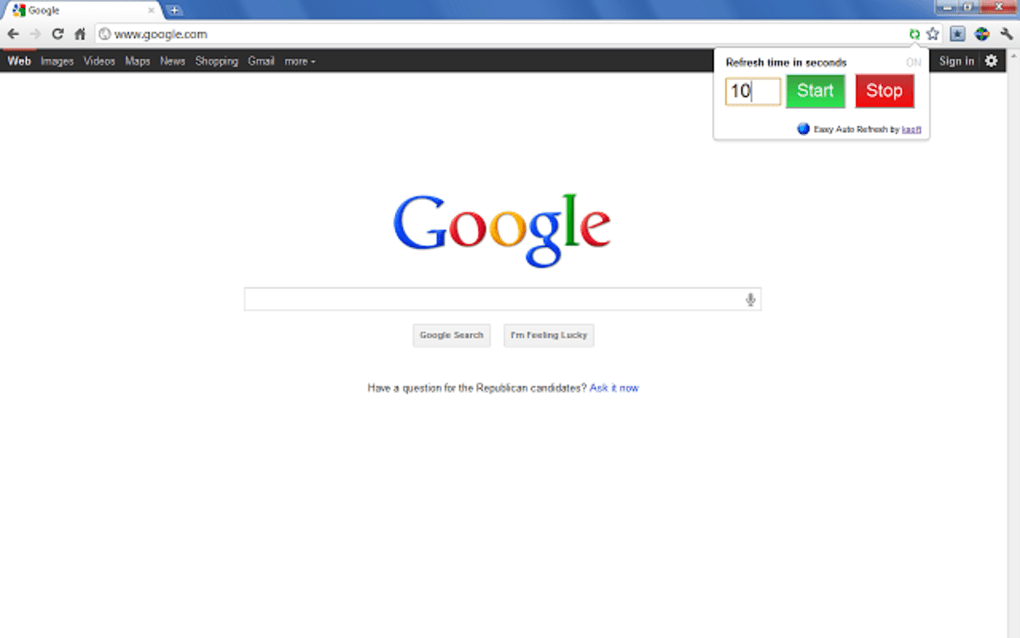
- Once installed, you’ll notice the Easy Auto Refresh icon (a circular arrow) appear in the toolbar, to the right of the address bar.
- Click the icon on the tab you wish to auto‑refresh. A small popup will appear where you can set the interval. Enter a number and choose the unit (seconds or minutes).
- Press Start to activate the timer. The page will now reload automatically at the specified cadence.
- To stop the auto‑refresh, click the icon again and select Stop or close the tab.
A few practical tips can enhance your experience:
- Save your work first: Because the free version does not protect unsaved form data, always submit or copy important information before the refresh cycle begins.
- Use separate tabs for different intervals: The extension applies settings per tab, so you can have one page refreshing every 30 seconds while another updates every 5 minutes.
- Monitor performance: Although the extension is lightweight, extremely short intervals (e.g., 1‑second refresh) may increase CPU usage, especially on data‑heavy pages.
Updating the extension is handled automatically by Chrome. When a new version is published, Chrome will download and install it in the background, ensuring you always have the latest features and security patches without manual effort.
Pros & Cons
Pros
- Free and easy to install directly from the Chrome Web Store.
- Highly customizable refresh intervals for precise control.
- Minimal impact on browser performance due to lightweight code.
- Instant activation from the toolbar, eliminating the need for separate windows.
- Automatic updates keep the extension secure and compatible.
Cons
- Lacks advanced safeguards such as preventing loss of unsaved form data.
- Each tab must be configured individually; no global settings.
- No intelligent detection of user activity—pages refresh regardless of interaction.
- Currently unavailable for macOS, Linux, Android, or iOS browsers.
- Free version does not include premium features like conditional refresh rules.
FAQ & Conclusion
Can Easy Auto Refresh be used on multiple tabs at the same time?
Yes. The extension applies settings per tab, so you can configure different refresh intervals for each open page independently.
Will the extension work on Chrome for macOS?
Currently, Easy Auto Refresh is published only for the Windows version of Chrome. macOS users will need to wait for a future update or seek an alternative extension.
Is there a risk of losing unsaved data when a page refreshes?
Yes. The free version does not protect against data loss. It is advisable to save or submit any form entries before starting the auto‑refresh cycle.
How often does the extension receive updates?
Updates are released through the Chrome Web Store as needed, typically when new Chrome versions are launched or when bug fixes are required.
Can I set a condition to stop refreshing after a certain number of reloads?
The current free version does not support conditional stop rules. Users would need to manually stop the refresh or look for a premium alternative.
Conclusion – If you need a straightforward, cost‑free solution to keep specific webpages up‑to‑date, Easy Auto Refresh delivers exactly that. Its intuitive toolbar icon, customizable intervals, and lightweight footprint make it an ideal companion for anyone who monitors live data or news feeds. While the lack of advanced safeguards and multi‑platform support may be a drawback for power users, the core functionality remains reliable and easy to use. Download Easy Auto Refresh today from the Chrome Web Store, set your desired refresh rate, and enjoy a hands‑free browsing experience. Remember to save any work before enabling the timer, and you’ll find this tool to be a valuable addition to your Chrome workflow.







